If you have ever watched a producer flicking their fingers across a grid of glowing rubber squares to build a beat, you have seen a MIDI pad controller in action. MIDI—short for Musical Instrument Digital Interface—is a communication standard that lets hardware talk to software: press a pad, and your computer’s drum plugin hears a note. The pad grid itself is just a tactile, expressive way to trigger those notes, replacing the mouse-click workflow most people start with in a DAW (Digital Audio Workstation, the software used for recording and producing music). Pad controllers range from simple USB devices under $100 all the way to standalone grooveboxes that double as full production studios. This guide breaks down what actually separates one controller from another, which workflow style each design serves best, and how to make a clean decision if you are currently choosing between two or three options.
What Actually Differentiates Pad Controllers (Beyond Pad Count)
The marketing copy on every pad controller emphasizes pad count and RGB lighting. Neither tells you much about whether a device will fit your workflow. The factors that matter in practice are pad feel and sensitivity, onboard processing, DAW integration depth, and standalone capability.
Pad feel and velocity sensitivity determine whether finger drumming is actually playable or whether you end up grid-editing everything anyway. Reviewers at MusicRadar consistently note that pad size, rubber compound, and pressure-to-velocity curve are more decisive than raw pad count—a 4×4 grid of well-tuned, 45mm pads will outperform a cramped 8×8 grid of stiff, cheap rubber for live performance. Akai’s MPC pads have set the industry benchmark for decades; owners across long-run reviews on the MPC One, MPC Live II, and MPC Key 61 cite the large, pressure-sensitive pad surface as the clearest competitive advantage over rival grids. Native Instruments Maschine MK3 owners report a similar quality tier, with slightly firmer resistance that some finger drummers prefer for faster tempos.
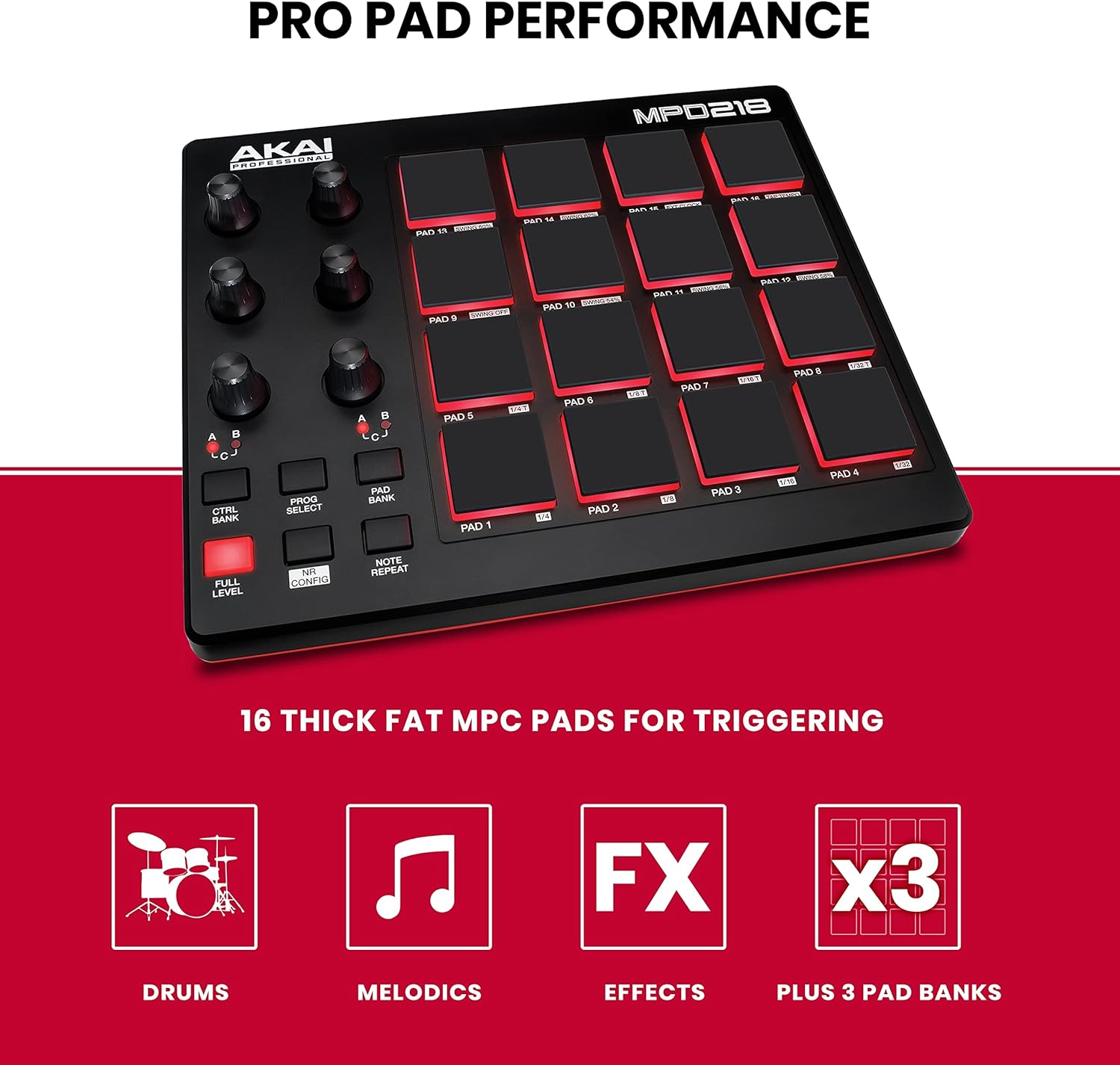
Onboard processing is the fork in the road. A class-compliant USB controller—like the Arturia BeatStep Pro or Akai MPD218—sends MIDI data to your computer and does nothing else. Pull the USB cable and it’s inert. A standalone groovebox—like the Akai MPC One+ or Native Instruments Maschine+—contains its own CPU, storage, and audio interface, so it can sequence, sample, and play back a full arrangement without a laptop. The CDM (Create Digital Music) review of the Maschine+ frames this tradeoff plainly: standalone capability buys you stage freedom, but you pay for it in price and in a more complex learning curve compared to pure controller mode.
DAW integration depth splits the market along brand allegiance lines. Native Instruments Maschine controllers integrate natively and deeply with Maschine software, and also map to most major DAWs via HUI (Human Interface protocol) or Mackie Control emulation—but the tightest experience stays within the NI ecosystem. Ableton Push 3 was purpose-built to control Ableton Live, and according to Sweetwater’s MIDI Controllers Buying Guide, it remains the highest-fidelity integration available for Live users: every encoder, pad, and display element reflects the software’s state in real time. Akai’s MPC workflow, by contrast, is largely self-contained—it integrates with DAWs but is designed to be the center of a session, not a peripheral.
The Three Core Workflow Archetypes
Understanding which workflow you are actually building for narrows the field fast.
1. Finger Drumming as a Performance Instrument
This is the MPC-lineage tradition: play beats in real time, capture the feel, quantize (or don’t) after the fact. Finger drumming as a serious discipline has its own pedagogy—the Melodics app and YouTube channels like Marc Rebillet’s process explainers have made the technique more teachable than ever—but the hardware requirements are non-negotiable. You need large, sensitive pads; a low-latency audio interface in the signal path; and ideally four to eight banks of sixteen pads so you can load a full kit and melodic elements without menu-diving.
For this workflow, the Akai MPC Live II (street price approximately $799–$899 as of mid-2026) and MPC One+ (approximately $599–$649) are the community consensus picks. Sound On Sound’s review of the MPC One+ specifically calls out the pad sensitivity and the built-in sampler as co-dependent features: the pads become most powerful when you are playing your own samples, not just triggering a preset library. Native Instruments Maschine MK3 (approximately $499) is the strongest alternative; Attack Magazine’s pad controller overview positions it as the better choice for producers who want to stay inside Ableton or Logic Pro and use Maschine as a control surface rather than a standalone unit.
2. DAW-Centric Beat Programming
Here the controller is a peripheral, not a brain. The goal is faster, more tactile access to DAW functions—launching clips, switching drum rack layers, nudging automation—compared to mousing through a screen. Pad feel matters less; DAW integration depth matters most.
For Ableton Live users, Ableton Push 3 (approximately $799 in controller mode; $1,499 in standalone mode) is the straightforward answer. The workflow parity between the hardware and the software is documented in Ableton’s own published integration spec sheets and confirmed consistently across aggregated user reviews: encoders map to macro controls without configuration, pads show clip states in color, and the Step sequencer mirrors Live’s clip view logic exactly. For Logic Pro users on Apple Silicon Macs, the picture is less clean—Logic’s hardware integration has historically lagged Ableton’s, and most producers in that camp run Maschine or an MPC in hybrid mode.
For producers who work across multiple DAWs or do not want to lock into a brand ecosystem, the Arturia BeatStep Pro (approximately $199) occupies a useful middle position. It is a sequencer and pad controller that speaks fluent MIDI and CV (Control Voltage—the signal format used by modular synthesizers), making it a bridge device between software sessions and a Eurorack rack. Owners in modular-focused communities regularly cite it as the most versatile utility controller at that price point.
3. Standalone Production: No Laptop Onstage
For live performers who want to leave the computer at home, standalone capability is the primary filter. The Akai MPC line (MPC Live II, MPC Key 61) and the NI Maschine+ are the two serious options in the $799–$1,499 range. Below that, the Polyend Tracker+ (approximately $499) offers a different paradigm—tracker-style sequencing rather than pad-based performance—which has its own devoted following among producers who think in patterns rather than real-time performance.
The practical tradeoff CDM identified in their Maschine+ review holds across the category: standalone units run their own operating systems, which means firmware updates, occasional bugs, and a workflow that diverges somewhat from the desktop software experience. Producers who split time between studio sessions (laptop) and live performance benefit most from units that do both; producers who are purely studio-based rarely need to pay the standalone premium.
By the Numbers: Mid-2026 Market Reference
| Controller | Approx. Street Price | Standalone? | Pad Grid | Best-Fit Workflow |
|---|---|---|---|---|
| Akai MPD218 | ~$79 | No | 4×4 (16 pads) | Budget DAW pad input |
| Arturia BeatStep Pro | ~$199 | No | 16 pads + step seq | DAW + Eurorack hybrid |
| NI Maschine MK3 | ~$499 | No | 4×4 (16 pads) | DAW-centric, NI ecosystem |
| Akai MPC One+ | ~$599 | Yes | 4×4 (16 pads) | Standalone / finger drumming |
| Ableton Push 3 (controller) | ~$799 | No | 8×8 (64 pads) | Ableton Live deep integration |
| Akai MPC Live II | ~$849 | Yes | 4×4 (16 pads) | Standalone live performance |
| Ableton Push 3 (standalone) | ~$1,499 | Yes | 8×8 (64 pads) | Ableton-native standalone rig |
Prices are community-reported street prices as of mid-2026 and fluctuate with availability.
DAW Integration: What “Deep Integration” Actually Means
The phrase “deep DAW integration” gets used loosely, so it is worth pinning down what it delivers in practice. At the shallow end, any class-compliant USB MIDI controller will trigger notes in any DAW with zero configuration—that is table stakes. Mid-tier integration means the controller’s transport buttons (play, stop, record) and faders can be mapped to DAW controls via a standard protocol like Mackie Control or HUI, which most DAWs support. Deep integration means the hardware and software were co-designed: the controller’s display shows DAW-native information (track names, plugin parameters, clip colors), and software updates to the controller happen through the DAW rather than a separate firmware tool.
According to Sweetwater’s MIDI Controllers Buying Guide, the practical payoff of deep integration is reduced mode-switching during a session—the hardware reflects what is happening in the software without manual configuration, which matters most in live-tracking scenarios where stopping to reassign a knob breaks creative momentum. For producers who record drums live (either real or electronic kit routed through a DAW), this friction reduction is meaningful. For producers who program beats entirely with a mouse after the fact, the integration depth is nearly irrelevant.
Attack Magazine’s pad controller overview makes a useful point about ecosystem lock-in: the deeper the integration, the more pain involved in switching DAWs or hardware later. Push 3 owners who move to Logic or Bitwig face real reconfiguration work. Maschine users who want to sell the hardware and switch to an MPC workflow need to rebuild their sample library logic from scratch. These are not dealbreakers, but they belong in the decision.
Clear Decision Rules
If your primary goal is finger drumming as a real-time performance skill and you work mostly in software, the Maschine MK3 or MPC One+ are the two options worth comparing seriously—the choice between them comes down to whether you are already inside Ableton (Maschine) or want to build a portable, self-contained workflow (MPC One+).
If you are an Ableton Live user building a studio rig and performance setup around that single DAW, Push 3 in controller mode is the highest-fidelity choice at its price point, and the standalone upgrade path exists if your live performance needs grow.
If you are integrating a pad controller into a Eurorack-centered setup, the BeatStep Pro’s CV outputs make it the obvious bridge device. Nothing else at that price point speaks both MIDI and CV fluently enough to serve as a genuine control hub.
If you are starting under $200 and need to learn whether pad drumming will stick before committing, the MPD218 is the correct risk-managed entry. It will not limit your technique development, and the money you save stays available for the upgrade that will matter more once you know your workflow.
The underlying principle across all of these: buy for the workflow you are actually running, not the one you imagine you might run someday. A Maschine+ sitting in DAW controller mode is a $1,499 solution to a $499 problem. An MPD218 in a serious live rig is a bottleneck waiting to frustrate you. Match the tool to the task, and the market in mid-2026 has a well-priced option at almost every tier.